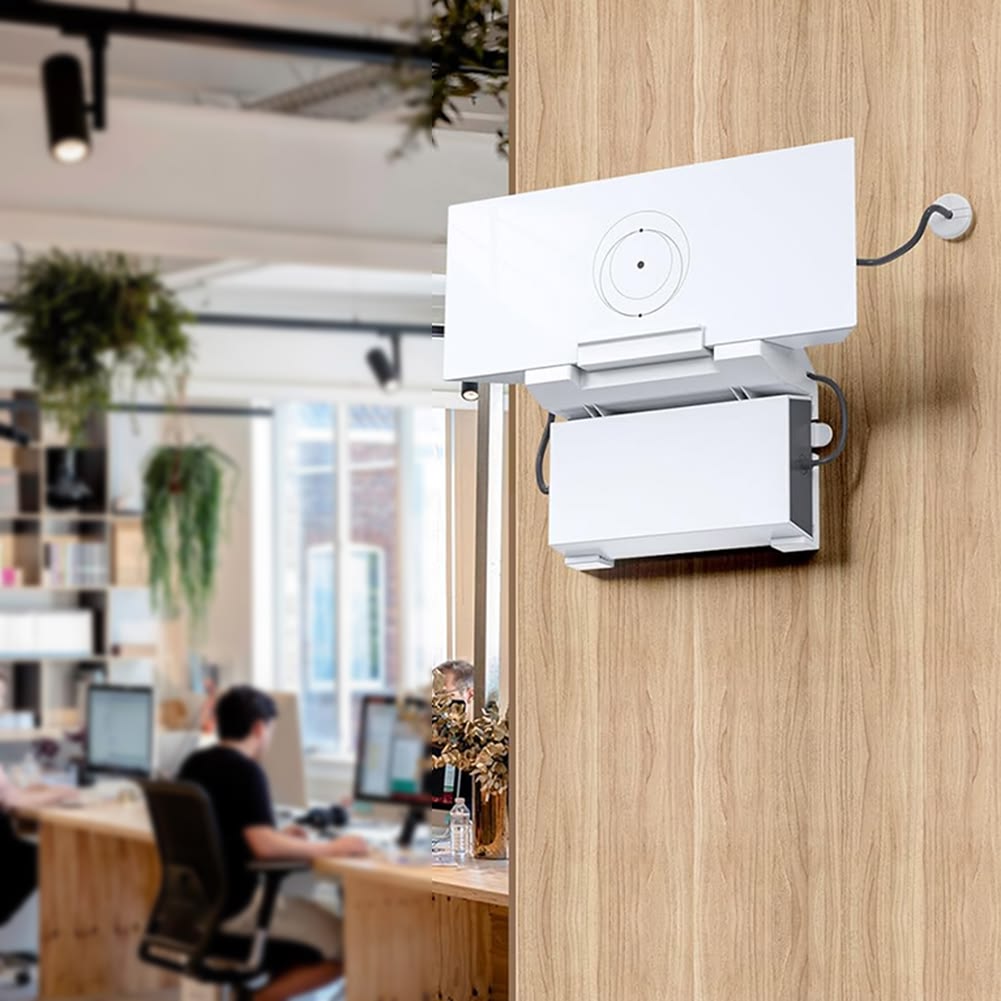
Starlink Gen 3 Router Mount
Buy the Starlink Gen 3 Router Mount in Kenya for a clean, secure, and professional installation of your Starlink Gen 3 (V4) router. Ideal for homes, offices, hotels, schools, hospitals, warehouses, and business premises. Improve router placement, cable management, and Wi-Fi performance with a genuine Starlink router mounting solution. Available from Starlink Kenya with nationwide delivery and installation support.
KES 28,000.00
KES 33,000.00
Product Details
Starlink Gen 3 Router Mount Price in Kenya
Professional Router Placement for Better Starlink Network Performance

In many installations, routers are simply placed on desks, shelves, cabinets, or countertops. While this approach may work temporarily, it often creates challenges such as cluttered cabling, accidental disconnections, poor signal distribution, dust accumulation, and increased risk of damage. The Starlink Gen 3 Router Mount addresses these issues by providing a secure mounting solution that allows the router to be positioned properly for both performance and aesthetics.
Whether you are installing Starlink in a home in Nairobi, an office in Westlands, a hotel in Mombasa, a school in Eldoret, a hospital in Kisumu, or a warehouse in Thika, the Starlink Gen 3 Router Mount helps create a professional and reliable networking environment while maximizing the value of your Starlink internet connection.
What is the Starlink Gen 3 Router Mount?
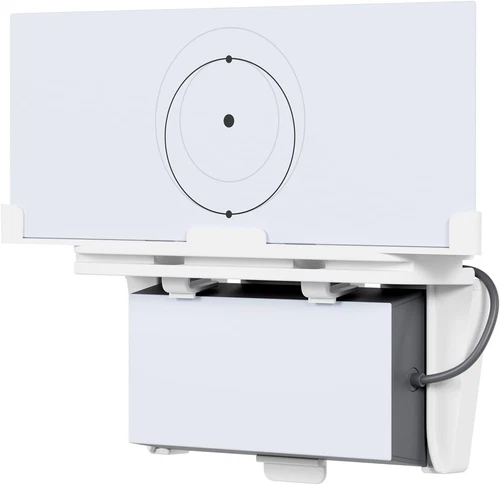
The Starlink Gen 3 Router Mount is a purpose-built accessory designed to securely mount the Starlink Gen 3 router to walls, cabinets, network enclosures, equipment racks, and other suitable surfaces.
Its primary functions include:
- Router stabilization
- Wall mounting
- Improved cable management
- Better Wi-Fi positioning
- Equipment protection
- Space optimization
- Professional installations
- Cleaner network deployments
The mount helps ensure the router remains secure while maintaining optimal wireless coverage throughout the property.
Table 1: Detailed Technical Specifications
| Specification | Details |
|---|---|
| Product Name | Starlink Gen 3 Router Mount |
| Compatible Device | Starlink Gen 3 (V4) Router |
| Mount Type | Router Wall Mount |
| Installation Surface | Walls, Cabinets, Enclosures |
| Indoor Use | Yes |
| Outdoor Use | No |
| Residential Use | Yes |
| Commercial Use | Yes |
| Educational Use | Yes |
| Hospitality Use | Yes |
| Healthcare Use | Yes |
| Industrial Use | Yes |
| Cable Management Support | Yes |
| Space Saving Design | Yes |
| Professional Deployment Support | Yes |
Why Router Placement Matters
Many users underestimate how much router placement influences Wi-Fi performance.
Poor router placement can lead to:
- Weak Wi-Fi signals
- Reduced coverage
- Dead zones
- Signal interference
- Network instability
- Poor device connectivity
Proper mounting helps improve network performance by allowing the router to be positioned strategically within the building.
Improved Wi-Fi Coverage
Better placement often results in stronger signal distribution.
Reduced Interference
Elevated positioning helps reduce obstacles that block Wi-Fi signals.
Better Network Reliability
Proper installation supports more consistent connectivity.
Cleaner Installations
Organized mounting improves aesthetics and cable management.
Table 2: Benefits of Proper Router Mounting
| Benefit | Impact |
|---|---|
| Better Router Positioning | Improved Wi-Fi coverage |
| Enhanced Cable Management | Cleaner installations |
| Reduced Accidental Movement | Greater stability |
| Improved Safety | Lower damage risk |
| Better Device Connectivity | Stronger wireless performance |
| Professional Appearance | Cleaner setup |
| Easier Maintenance | Simplified troubleshooting |
| Space Optimization | More usable workspace |
| Improved Reliability | Consistent network performance |
| Future Scalability | Easier upgrades |
Ideal Installation Locations

The Starlink Gen 3 Router Mount is suitable for a wide range of installation environments.
Homes
Improves Wi-Fi coverage and reduces clutter.
Offices
Supports professional network deployments.
Hotels and Lodges
Provides organized networking infrastructure.
Schools
Supports educational connectivity systems.
Hospitals
Improves network reliability for communications and administration.
Warehouses
Keeps networking equipment secure and organized.
Table 3: Recommended Installation Environments
| Environment | Benefit |
|---|---|
| Homes | Better Wi-Fi coverage |
| Apartments | Improved space utilization |
| Offices | Professional networking |
| Hotels | Organized infrastructure |
| Schools | Reliable connectivity |
| Hospitals | Secure networking |
| Warehouses | Equipment protection |
| Retail Stores | Improved operations |
| Government Offices | Structured installations |
| NGOs | Reliable communications |
Improve Cable Management and Organization
One of the biggest advantages of the Router Mount is improved cable organization.
Without a mount, cables often become:
- Tangled
- Exposed
- Disorganized
- Difficult to maintain
A mounted router creates a cleaner network environment.
Benefits include:
Easier Maintenance
Technicians can access equipment more efficiently.
Improved Appearance
Creates a more professional installation.
Better Safety
Reduces cable-related hazards.
Equipment Protection
Helps prevent accidental disconnections.
Table 4: Cable Management Benefits
| Feature | Benefit |
|---|---|
| Organized Cabling | Cleaner installations |
| Reduced Clutter | Improved aesthetics |
| Easier Access | Faster maintenance |
| Equipment Security | Reduced damage risk |
| Better Airflow | Improved cooling |
| Professional Appearance | Enhanced presentation |
| Improved Safety | Reduced hazards |
| Simplified Troubleshooting | Faster repairs |
| Future Expansion Support | Easier upgrades |
| Long-Term Reliability | Better network stability |
Why Professional Installation Matters
Although the Router Mount is straightforward to install, professional deployment helps maximize performance and reliability.
Professional installation ensures:
- Optimal router placement
- Secure mounting
- Proper cable routing
- Wi-Fi optimization
- Network planning
- Future scalability
At Starlink Kenya, our network engineers, technologists, and technicians assess each site to determine the most effective router placement strategy.
Table 5: Professional Installation Advantages
| Service | Benefit |
|---|---|
| Site Assessment | Better positioning |
| Wi-Fi Analysis | Improved coverage |
| Cable Management | Cleaner setup |
| Secure Mounting | Increased reliability |
| Network Optimization | Better performance |
| Equipment Protection | Reduced maintenance |
| Future Planning | Easier expansion |
| Technical Support | Ongoing assistance |
| Professional Finish | Enhanced appearance |
| Performance Testing | Reliable connectivity |
Why Buy from Starlink Kenya?
At Starlink Kenya, we provide genuine Starlink accessories and professional networking solutions designed to maximize the performance of your Starlink system.
Our services include:
- Genuine Starlink Gen 3 Router Mounts
- Professional Starlink installations
- Wi-Fi optimization
- Network expansion
- Structured cabling
- Site surveys
- Technical troubleshooting
- Business networking solutions
- Starlink relocation support
- Nationwide delivery and installation
Our network engineers, technologists, and technicians help customers build reliable and professional Starlink-powered networks throughout Kenya.
Frequently Asked Questions (FAQs)
1. What is the Starlink Gen 3 Router Mount?
The Starlink Gen 3 Router Mount is a mounting accessory designed to securely hold the Starlink Gen 3 (V4) router on walls and other suitable surfaces.
2. Why should I mount my Starlink router?
Mounting improves router positioning, cable management, equipment protection, and overall installation quality.
3. Which router is compatible with this mount?
The mount is designed specifically for the Starlink Gen 3 (V4) router.
4. Does mounting improve Wi-Fi performance?
Proper positioning can improve signal distribution and reduce coverage issues.
5. Is it suitable for homes?
Yes. Residential installations are among its most common applications.
6. Can businesses use the Router Mount?
Absolutely. Offices, hotels, warehouses, and commercial facilities benefit from organized networking infrastructure.
7. Is the mount suitable for schools?
Yes. Educational institutions often use mounted networking equipment for improved organization and reliability.
8. Can hospitals use the Router Mount?
Yes. Healthcare facilities benefit from secure and organized networking equipment.
9. Does the mount save space?
Yes. Wall mounting frees up desk, shelf, and cabinet space.
10. Can it improve cable management?
Yes. One of its biggest benefits is cleaner and more organized cable routing.
11. Is professional installation recommended?
Yes. Professional installation helps optimize router placement and overall network performance.
12. Can the mount reduce accidental disconnections?
Yes. Secure mounting helps protect equipment and cabling from accidental interference.
13. Is it suitable for warehouses?
Yes. Warehouses frequently use mounted networking equipment to improve organization and reliability.
14. Why choose a genuine Starlink Router Mount?
Genuine accessories provide proper compatibility, secure fitment, and long-term reliability.
15. What is the biggest advantage of the Router Mount?
It helps create a cleaner, safer, and more professional Starlink network installation while improving router positioning.
Additional Important Statements
Proper router placement is one of the most overlooked factors affecting Wi-Fi coverage and overall network performance.
The Starlink Gen 3 Router Mount helps transform a basic installation into a professional networking deployment.
For homes, offices, hotels, schools, and businesses, a mounted router often results in better organization, improved reliability, and easier maintenance.
Starlink Gen 3 Router Mount Video Guide
The Starlink Gen 3 Router Mount is designed to provide a secure and organized solution for positioning your Starlink router. While the router itself is responsible for distributing internet connectivity throughout the property, its effectiveness depends heavily on where and how it is installed. A properly mounted router can improve coverage, reduce clutter, and create a more reliable networking environment.
One of the key benefits of the Router Mount is its ability to support professional installation standards. By organizing equipment and cabling more effectively, it helps create cleaner and more efficient deployments in homes, offices, hotels, schools, warehouses, and healthcare facilities.
By combining secure mounting, space-saving design, improved cable management, and better router positioning, the Starlink Gen 3 Router Mount helps users maximize the performance and reliability of their Starlink internet connection. It is a practical accessory for anyone seeking a more professional and organized Starlink installation.
The Starlink Gen 3 Router Mount is an essential accessory for users who want to improve router placement, optimize Wi-Fi coverage, enhance cable management, and create a more professional networking environment. Its durable design, secure fitment, and compatibility with the Starlink Gen 3 router make it an excellent choice for residential, commercial, educational, hospitality, healthcare, and industrial applications.
By providing a dedicated mounting solution, the Router Mount helps improve network organization, equipment protection, and overall installation quality. Whether you are deploying Starlink in a home, office, hotel, school, warehouse, or hospital, this accessory helps ensure your networking equipment remains secure and properly positioned.
For genuine Starlink Gen 3 Router Mounts, professional installation services, Wi-Fi optimization, structured cabling solutions, and expert technical support throughout Kenya, Starlink Kenya is your trusted partner. Our experienced network engineers, technologists, and technicians are ready to help you build a reliable, organized, and high-performance Starlink-powered network.